Archive for the ‘Question Slides’ Category

When have you actualy tried to answer a question? I think after you actually gave an answer. Captivate thinks differently. The moment a question slide is displayed, Captivate counts this as an attempt.

This is very annoying when the student only has  one attempt, and upon seeing the question decides to review the previous content.

In this demo you see that Captivate sets the counter to one when the question is displayed for the first time. Use the Previous button on the Questionslide to review the content and return to the question.

If you also want Adobe to change this please vote on:

http://captivate6ideas.ideascale.com/a/dtd/Only-count-as-attempt-when-submit-button-is-pressed/323491-11786


Wanneer heb je een poging gedaan om een vraag te beantwoorden? Volgens mij is dat als je ook daadwerkelijk een antwoord hebt gegeven. Captivate denkt daar echter anders over. Op het moment dat een questionslide wordt getoond, telt Captivate dit als een poging.

Dit is erg vervelend als de cursist maar één poging krijgt en bij het zien van de vraag besluit om de eerdere lesstof toch nog maar eens door te nemen.

Hieronder zie je dat Captivate het aantal pogingen al op 1 zet zodra de slide wordt getoond. Klik in het vraagscherm op de knop Previous en probeer daarna nogmaals om de vraag te beantwoorden.

Als jij ook graag ziet dat Captivate dit verandert, breng dan een stem uit op:

http://captivate6ideas.ideascale.com/a/dtd/Only-count-as-attempt-when-submit-button-is-pressed/323491-11786

Download

  exampleQuestionAttempts_640x480.zip (1.0 MiB, 378 hits)

Advanced Question Options are great if you want to customize the feedback and jump to specific slides.

However, you cannot use these options if the question is part of a Question Pool.

This example shows what happens when you use Advanced Question Options in Question Pool questions.

Advanced Question Options zijn ideaal als je de feedback wilt afstemmen op het gegeven antwoord of als je naar specifieke slide wilt springen.

Helaas kan je deze opties niet gebruiken als de vraag onderdeel is van een Question Pool.

Dit voorbeeld laat zien wat er gebeurt als je Advanced Question Options gebruikt bij een vraag uit een Question Pool.


I am not the first with this problem: On Sep 3 2011 Lori reported the same problem on the Adobe Forum (#3900104). Today I reported this problem/bug to Adobe.

Perhaps the fact that the Question Pool is stored in a seperate swf is the cause of the problem?

Ik ben niet de eerste met dit probleem: Op 3 september 2011 meldde Lori het al op het Adobe forum (#3900104). Ik heb dit probleem/bug vandaag gemeld bij Adobe.

Mogelijk is het feit dat de Question Pool in een aparte swf wordt opgeslagen de oorzaak van het probleem?

It’s a bug! (Update 20 november 2011)

Today I received a message from the supportdesk that this is a bug in Captivate. The supportdesk made a bugreport it and advised me to do the same. If you also want to report this bug: https://www.adobe.com/cfusion/mmform/index.cfm?name=wishform Vandaag kreeg ik bericht van de supportdesk dat dit een bug in Captivate is. De supportdesk heeft een bugreport aangemaakt en adviseert mij hetzelfde te doen. Als jij deze bug ook aan Adobe wilt melden dan kan dat via: https://www.adobe.com/cfusion/mmform/index.cfm?name=wishform 


Download the file (CP5)

  exampleAdvancedAnswerOptionQuestionPool_640x480.zip (1.6 MiB, 349 hits)

If you are using Question Slides then there are a lot of settings. I’ll show to you what the (im) possibilities are of:

  • Failure Levels
  • Message Retry
  • Advanced Answer Options 
Als je gebruik maakt van Question Slides dan zijn er een hoop instellingen. Ik laat hieronder zien wat de (on)mogelijkheden zijn van:

  • Failure Levels
  • Retry Message
  • Advanced Answer Options

Failure Levels

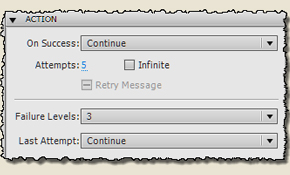
These can be set from 0 to 3 and determine which Failure Caption is displayed. If you’ve set Failure Levels to 0, you will see not Failure Caption. Have you set three levels three Failure Captions will appear. Every Failure Level has its own caption.

In the example below you see a question in which the student has 5 attempts. After the first three wrong attempts a Failure Caption is shown. After the fourth attempt, there is no caption. And after the fifth (in this case the last) the Failure Caption of the last Failure Level appears.

Deze kan je instellen van 0 – 3 en hiermee bepaal je welke Failure Caption wordt getoond. Als je Failure Levels op 0 hebt ingesteld, verschijnt er geen Failure Caption. Heb je de levels ingesteld op 3 dan verschijnen achtereenvolgens drie Failure Captions. Bij ieder Failure Level hoort een eigen caption.

In het voorbeeld hieronder zie je een vraag waarbij de cursist 5 attempts (pogingen) mag doen. Bij de eerste drie verkeerde pogingen verschijnt een Failure Caption. Bij de vierde poging verschijnt er geen en bij de vijfde (in dit geval de laatste) verschijnt de Failure Caption die bij het laatste Failure Level hoorde.


Retry Message

If the feedback does not have to depend on the number of times that the student has made ​​a wrong choice, it is better to use a Retry Caption. The example below shows how it works. Als de feedback niet afhankelijk hoeft te zijn van het aantal keren dat de cursist een verkeerde keuze heeft gemaakt, is het handiger om aan de vraag een Retry Caption toe te voegen. Het voorbeeld hieronder laat zien hoe het dan werkt.


Advanced Answer Options

With the Advanced Answer Options you can give specific answer feedback. You find the settings by selecting the answer and then select the Properties tab.

If an answer is associated with an Advanced Option Answer no Retry Caption appears . In the example below only the first two answers have an Advanced Option.

Met Advanced Answer Options kan je per gegeven antwoord specifieke feedback geven. Je komt bij de betreffende instellingen door antwoord te selecteren en dan het tabblad Properties.

Als aan een antwoord een Advanced Answer Option is gekoppeld verschijnt er geen Retry Caption. In het voorbeeld hieronder hebben alleen de eerste twee antwoorden een Advanced Answer Option.


Download all examples /alle voorbeelden (CP5)

  examplesQuestionSlideSettings.zip (1.0 MiB, 330 hits)

Chris Dorna
  • E-learning advies
  • Ontwikkeling e-learningcursussen
  • Opleiding en begeleiding van ontwikkelaars lesstof
  • Bouwen lestof in Captivate en veel andere tools
  • Bouwen Captivate widgets
  • Ontwerpen illustraties
  • Bouwen Flash animaties

Contact
Adres Torenstraat 13
5261 BR Vught
Telefoon 06 - 50 41 05 41
E-mail info@dorna.nl
KvK 17194585
BTW NL0969.24.305.B01
Bank ING 5105193